Editor
These bugs are in TED, the editor of Blitz Basic 2 that blitz2 loads and that also runs on its own as a text editor. They concern what the editor does with the text in memory and in the files it saves, and whether it starts and runs at all, not the programs that are compiled from it. The first sections show the ones an ordinary user can run into, each with a short example; the other fixes follow as a list of short points, each with a link to its issue. The table on Important Fixes & Breaking Changes lists all fixed bugs by what they can change in a program.
The menu items are named as the editor’s menus show them: BLOCK UNTAB,
BLOCK TAB, COPY, KILL, BLOCK TO DISK, JOIN and DELETE LINE are in the
EDIT menu; LOAD, SAVE, DEFAULTS, PRINT and CLI are in the PROJECT menu.
“Tokenise” and “Tab Stop” are settings of the editor’s default options
(DEFAULTS), which the editor keeps in the file L:blitzeditor.opts.
When the editor runs under blitz2, “Tokenise” is on and the editor keeps
the lines of a source as tokens; on its own, it keeps them as text.
Block commands
BLOCK UNTAB removed text, not only indentation
BLOCK UNTAB is meant to take one level of indentation away from every line of the marked block. The original did not look at the characters it removed: it cut the first characters of each line, as many as the tab stop, whatever they were. A line that was not indented that far lost the start of its text, and a line no longer than the tab stop became empty. With the tab stop set to 0, every line of the block became empty.
What happened
With the tab stop 2, mark these three lines as a block and choose BLOCK UNTAB:
If a=1
  NPrint "one"
EndIf
The original leaves
 a=1
NPrint "one"
dIf
The indented line is right, but If and En are gone from the other
two. Saved like this, the source no longer compiles as it did.
With the port
If a=1
NPrint "one"
EndIf
BLOCK UNTAB removes only spaces at the start of a line, up to the tab stop. A line indented by fewer spaces loses those it has, and a line that does not start with a space stays as it is. With the tab stop 0, nothing changes.
Issue: BLOCK UNTAB removed the first characters of every line, whatever they were (#348).
Joining lines
JOIN of two long lines lost the end of the text
JOIN appends the next line to the current one. A line of the editor holds at most 128 characters, and the original did not check whether the two lines fit into one: when they were longer than that together, it kept the first 128 characters and dropped the rest without a beep or a message. With “Tokenise” on, the cut could go through the middle of a keyword, whose first part stayed behind as plain text. JOIN cannot be undone, so the text was lost.
What happened
The current line is 124 characters long (a long comment, say), and the next line is
a=1:b=2After JOIN, the line ends with the 124 characters and a=1:; b=2 is
gone from the source.
With the port
JOIN refuses with a beep when the two lines would be longer than 128 characters together, as it does on the last line, where there is nothing to join. Both lines stay as they are, and nothing else changes. Shorten one of them and join again, or leave them as two lines.
Accented letters without tokenising
Accented letters broke saved blocks, copied blocks and printouts
Without tokenising, as always in the editor on its own, a line holds plain text, and characters like ä, ö, ü, ß or é are ordinary characters of it (Latin-1 characters, with codes of 128 and more). The original mistook them for something else:
- COPY took the first such character of the block for the end of the block and stopped there.
- BLOCK TO DISK did the same in the first and the last line of the block. In the lines between them, it took such a character for a keyword token and wrote a keyword name instead of that character and the next.
- PRINT took every such character for a keyword token in the same way, and printed the keyword name in bold.
Since the editor on its own has no keywords, the name was ????? or a
garbage word read from memory.
What happened
In the editor on its own, with the lines
x
a$="Größe":NPrint a$
b
mark the first two lines as a block and choose BLOCK TO DISK. The file
the original writes ends after a$="Gr; the rest of the block is
missing. With the lines
a
; Größe
b
c
and the first three lines marked, the middle line in the file reads
; Gr?????e. PRINT of a line ; Größe prints ; Gr, a bold ?????
and e.
With the port
Without tokenising, BLOCK TO DISK and COPY take the whole block, and
BLOCK TO DISK and PRINT write every line as it is: the saved block holds
a$="Größe":NPrint a$ and ; Größe, and the printout shows ; Größe.
With “Tokenise” on, as under blitz2, the commands work as in the original;
how PRINT handles the umlauts there is described in
PRINT sent umlauts to the printer as control characters.
Issues: a character of 128 or more ended the block in BLOCK TO DISK and COPY (#362), BLOCK TO DISK wrote such characters of the middle lines as keyword names (#354), PRINT printed them as bold keyword names (#371).
Loading text sources
The last line of a text source was not tokenised
The editor loads plain text as well as tokenised sources: a source written with another editor, or saved as text, is tokenised line by line while it is loaded, if “Tokenise” is on (which it is under blitz2). The original tokenised only the lines that end with a line feed. Many text files have no line feed after their last line, and that line stayed text. The same happened to a line too long for the editor, more than 127 characters: the editor splits it, and the first part stayed text.
What happened
A text source of two lines, with no line feed after the last one:
a=1
NPrint a
After loading it, the first line is tokenised and the second is not.
On the screen the line looks the same, but NPrint is not shown in the
token colour, and Help does not know it. When the source is saved, the
line is saved as the six letters of NPrint instead of the
token of NPrint, and the compiler, which reads the tokens, does not
take it as the command either. Only changing the line in the editor
tokenised it.
With the port
Both lines are tokenised, and so is the first part of a split long
line. NPrint is shown in the token colour, Help knows it, and the saved
file contains its token, like any other line.
A tokenised source, whose lines already hold tokens, is loaded as it is.
Issue: The last line of a text source without a final line feed was not tokenised (#376).
Umlauts in a text source joined lines
The editor took every byte of 128 or more in a text source for the
start of a keyword and the byte after it for the rest of that keyword.
An umlaut at the end of a line took the line feed with it, so two lines
became one; in front of a TAB it took the TAB; and it was shown as a
keyword or as ?????.
What happened
A text source from another editor:
; Grüße
NPrint "Größe"
In the original, the e at the end of the first line is followed by
the line feed, but the ü and ö are taken as keywords: the umlaut and
the character after it are gone, and the line shows a keyword name in
their place. With an umlaut as the last character of a line, the next
line is joined to it.
With the port
A byte of 128 or more in a text source is one character. The umlauts ä ö ü Ä Ö Ü become the same characters as when you type them, so the editor shows them and blitz2 puts them into the string. Without tokenising, as in the editor on its own, every character is kept and the file is saved byte for byte as it was loaded.
Other accented letters, such as ß or é, are kept too, in strings and comments (ß, é and other accented letters were lost).
Accented letters in strings and comments
ß, é and other accented letters were lost
Besides the umlauts ä ö ü Ä Ö Ü, the Amiga’s character set, Latin-1, has
many more letters and signs with codes of 128 and more: ß, é, à, ñ, °, £
and others. The original editor could keep only the six umlauts. Any
other of these characters was lost when you typed it, and in a text file
it was taken for a keyword
(Umlauts in a text source joined lines). A
program could print such a character only through Chr$, for example
Chr$(223) for ß.
What happened
Type this line into the original editor:
NPrint "Straße"The ß does not appear, and the line reads NPrint "Strae". The
compiled program prints Strae.
With the port
The line keeps the ß, and the program prints Straße. The editor keeps
every Latin-1 character in strings and comments, whether you type it,
load it from a text file or paste it from a block, with “Tokenise” on or
off. Saving as text writes the character’s own byte, so a text file is
saved as it was loaded. Search, the cursor, BLOCK TO DISK and PRINT
treat such a character as the one character it stands for.
The editor draws each of these characters as itself, in both font heights, also after scrolling sideways and after the screen is drawn again. The no-break space (code 160) is blank, and a control code from 129 to 159, which a text file can contain, is a small hollow box. The umlauts keep the editor’s own signs, except the ä of the 6 pixel font: the original’s looks like an ö cut off at the bottom, so the port draws it as an a with two dots.
The 8 pixel font takes its new signs from unscii-8 by viznut (public
domain), the 6 pixel signs are drawn in the
style of the editor’s own font. This is how the editor shows the
characters from code 160 on, the boxes, the umlauts and a line with
NPrint "Größe é £ ½", in the 8 pixel font:
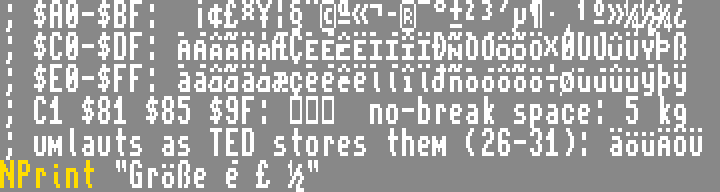
and in the 6 pixel font:
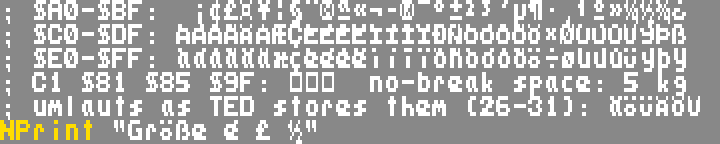
In a tokenised source the editor stores such a character as a literal
character: the byte $90 followed by the character’s code, two bytes
like a token
(Tokenised sources).
A line therefore holds at most 64 of them. A byte $80 in a text file
is not a Latin-1 character and becomes ?.
Outside a string and a comment, a literal character is an error: the compiler stops with “Syntax Error” at its line (Sources that compile differently).
With the original Blitz Basic 2
A source with literal characters is an ordinary tokenised source, with
no header and no marker. The original compiler reads it and puts the
same bytes into the strings. The original editor loads and saves it
without loss, but it cannot type such a character. It shows each one as
?????, or, with the userlib literallib.obj installed, as one sign in
the colour of keywords.
The port builds this userlib for the original Blitz Basic 2, in
build/amiga/variants/bb2-2.10/userlibs/literal/. Copy it into a
directory inside blitz2:userlibs/, such as blitz2:userlibs/literal/.
It is library 33, which names the literal characters. It works only when
no other library with the number 33 is loaded before it, so do not
install it together with RIDosLib, one of the RWE userlibs, which has
the same number
(The RWE userlibs).
Issue: Latin-1 characters in strings and comments (#1018).
PRINT sent umlauts to the printer as control characters
With “Tokenise” on, as under blitz2, the editor keeps the umlauts ä ö ü Ä Ö Ü that you type or load as six codes of their own, 26 to 31 (ä 26, ö 27, ü 28, Ä 29, Ö 30, Ü 31). The screen shows them as the umlauts, and the compiler turns them back into the Latin-1 umlauts in strings. The original PRINT did not: it sent the codes to the printer as they are, and these are control characters. Code 27, the ö, is ESC, so the printer took it and the characters after it as the start of an escape sequence, which swallowed or changed the text behind it. The other codes printed nothing or garbage, depending on the printer. Every printout of a source with umlauts was affected.
What happened
Under blitz2, print a source with the two lines
a$="Köln"
; äöüÄÖÜ
The original sends these bytes to the printer (control characters written in angle brackets):
a$="K<ESC>ln"
; <SUB><ESC><FS><GS><RS><US>
In the first line, the ö is missing, and the printer takes <ESC>l
and what follows for an escape sequence, so the rest of the line may
be swallowed or changed. In the second line, none of the six umlauts
is printed.
With the port
PRINT sends the Latin-1 umlauts, the same bytes a text save writes:
a$="Köln"
; äöüÄÖÜ
This holds everywhere in the line, in strings, in comments and behind keywords, with “Tokenise” on and off. Keywords are printed in bold, as in the original. Nothing in your sources needs to change: the editor stores the umlauts in the same way as the original, and only the printout differs. Printing without tokenising is described in Accented letters broke saved blocks, copied blocks and printouts.
Issue: PRINT sent the umlaut codes 26-31 to the printer as they are: ö is ESC (#1017).
Options and screen
A tab stop of 0 crashed the editor
The editor computes tab positions by dividing by the tab stop. The
original’s DEFAULTS requester accepted 0 for “Tab Stop”, and it even
turned every value of 80 and more into 0, with a beep. With a tab stop of
0, the next Tab key, Shift+Tab, or the loading of a file with a TAB
character divided by zero, and the Amiga stopped with a “Division by
zero” guru. A tab stop of 0 in L:blitzeditor.opts had the same effect
from the start.
What happened
Choose DEFAULTS, type 100 into “Tab Stop” and confirm: the editor
beeps and shows 0. Press the Tab key in the text, and the system
crashes.
With the port
A tab stop outside 1 to 79 typed into the requester is refused with the
beep: the field shows the previous value again, and the editor keeps
using it. In L:blitzeditor.opts, a tab stop of 0 is taken as 1, and
one above 79 as 79.
The editor did not start with the small font on a 512-row Workbench
The editor opens its own screen, as high as the Workbench screen, and fills it with as many text rows as fit. The original’s calculation came out one pixel row higher than the Workbench whenever the height of the Workbench less 20 pixels was a multiple of the font height. The most common case is “Use Small Font” (6 pixels high) on a PAL interlace Workbench of 512 rows; the normal font (8 pixels) is hit on a Workbench of 260 or 524 rows. The editor’s window then did not fit on its screen and could not be opened, and the original crashed instead of reporting it.
With the port
The screen always fits the Workbench. On those heights the editor has one text row less than the original tried to open; on every other height it has the same rows as before.
Other fixes
Each point says first what the original did, then what the port does.
Blocks
- BLOCK LOAD at a cursor column joined the text in front of the cursor and the file’s first line into one line of up to 256 characters. The first edit cut that line, and it could be saved empty. In the port, when the first line does not fit behind the cursor, BLOCK LOAD refuses with a beep (#1010).
- BLOCK LOAD cut the text behind the cursor at column 128 when it was appended to the last loaded line, and appended leftover characters to that line; the text behind the cursor gets a line of its own when it does not fit (#1012).
- Typing inside a block marked over several lines, in a source of more than 128 lines, stretched the block to the end of its last line. COPY, KILL or BLOCK TO DISK then acted on more text than was marked, or left the end of the block past column 127. In the port, the block keeps its end (#349).
- BLOCK TAB without tokenising, as in the editor on its own, added an invisible 0 byte to the end of every line of the block. When the file was saved and loaded again, it showed up as an extra empty line after each of them. In the port, the lines get only their indentation (#347).
- DELETE LINE on the only line of a one-line block removed the block but left the block items of the EDIT menu enabled, “Block” in the status line and the start mark of the block set; the block ends completely (#353).
Joining lines
- Every JOIN lost 8 to 16 bytes of memory until the next reboot; the memory of the joined line is freed completely (#364).
- A JOIN that moved the start of a block on the next line past column 127 left an inverted “ghost block” from that line to the end of the text, and the keys of KILL and BLOCK TO DISK acted on it. In the port, the block is removed and nothing else is marked (#346).
- JOIN with a next line that starts with a label left that label in the label column, pointing to memory that was already freed, so that a click on it jumped into freed memory; the label column is rebuilt without it (#365).
Long lines and keywords
- A line wider than 128 columns was written into the next line of the screen and behind the editor’s character map in chip memory; the line display ends at column 128 (#1011).
- A tokenised line whose text is longer than about 128 characters, as another program can write it, overwrote memory behind the editor’s buffers in KILL, BLOCK TO DISK, JOIN and when “Tokenise” was switched off. In the port, the text stops at the end of the buffer, and the part behind it is dropped (#355).
- PRINT of a line with more than about 24 keywords overwrote memory behind the editor’s buffers; the printed line ends with the last keyword that fits (#372).
- A word that reached the last column of a line, column 128, was matched
together with the start of the next line, so that
Priat the end andntat the start of the next line became the keywordPrint; the end of the line ends the word (#386). - Without a keyword list, as in the editor on its own, the editor looked keywords up through memory at address 0, which gave a garbage keyword name or a crash; it finds no keyword there (#359).
Loading and saving
- A line longer than the editor’s 128 columns in a file from another editor lost three characters where the editor split it, and BLOCK LOAD stopped at such a line and ignored the rest of the file. In the port, the line is split into pieces of up to 128 characters without loss, and the whole file is loaded (#375).
- In a tokenised source, a TAB behind a keyword on the same line went to the wrong column, because the original counted the keyword as two characters; it goes to the tab position the line shows (#377).
- A file whose last byte is 128 or more, such as a cut tokenised source or a text ending in an accented letter without a line feed, left half a keyword at the end of the last line, which made the editor read garbage behind it; that byte is dropped (#379).
- LOAD of an empty file kept the memory of the text loaded before allocated until the next reboot; that memory is freed (#358).
- After a write error while saving, such as a full disk, the original
still wrote the
.xtrafile and the icon next to the cut source, as if the save had worked; neither is written then (#380).
File requester
The editor’s file requester, as LOAD and SAVE show it, is the requester
of FileRequest$. The fixes of that requester on the page
Libraries
apply to the editor too. They concern long names in the list, tall
screens, the DRIVES list, the system libraries it left open, the
directories it kept in use and the path gadget after CD. Two of them
change what users of the editor see:
A file name of 64 or more characters, or a path of 160 or more, was copied into the requester’s fields without a limit and overwrote memory, and OK then crashed the editor. Such names occur on file systems with long names and in the host directories of an emulator. The port’s requester refuses such a name or path: it stays open, keeps its fields, and shows “Name too long” or “Path too long” in the title bar of the editor’s screen (Long file names overwrote memory, #1042).
The CD button made the drawer shown the editor’s current directory and released the directory the editor had been started in, which still belongs to the shell or to blitz2; the editor, and blitz2 with it, ended in the new drawer. CD still changes the current directory while the editor runs, but the start directory is kept and is current again when the editor ends (#157).
Options
- A colour value of 4 or more in a damaged
L:blitzeditor.optsmarked the wrong colour buttons and changed other data of the requester; the colour counts as 0 to 3 (#384). - Switching from the 6 to the 8 pixel font in the options left the cursor below the last row of the editor; it stays in the text (#352).
- A value other than 0 or 1 for “Tokenise” or “Create Icons” in
L:blitzeditor.opts, as in a damaged or hand-edited file, disabled or misdrew the check box in DEFAULTS; only the lowest bit of the value counts (#383). - A tab stop above 133 in
L:blitzeditor.optsmade the loading of a file with TAB characters overwrite memory behind the editor’s buffers; the expansion of a TAB stops at the end of the line buffer (#378).
Starting and ending
- When blitz2 started the editor with a source, the editor sometimes opened a wrong file or none, showing “Couldn’t open file!” or an empty text, depending on where blitz2’s files had landed in memory; it always opens the source it is given (#340).
- When the editor could not start, it reported success: blitz2 then went on as if the editor were running and crashed, and the editor on its own returned 0; blitz2 takes its error exit, and the editor on its own returns -1 (#357).
- The editor started from the Workbench let the Workbench unload it while its last instructions were still running, which could crash it at its end; it is unloaded only after it has ended (#387).
- The editor started from the Workbench without a project icon, when its
own
.infofile could not be read, tried to load that.infofile’s name, or bytes of it, as the text to edit; it starts with an empty text (#388). - A
.infofile of the editor that was too short to be read completely stayed open until the next reboot; it is closed (#389). - CLI with the Workbench screen closed did not run the shell and left its console window open as the editor’s input and output; it runs the shell and closes the window afterwards (#368).
Low memory
- While blitz2 starts under the editor, it allocates its buffers and opens its version requester. When an allocation failed or the requester window could not be opened, the editor jumped into its own main loop before that loop was running, and the system crashed; the editor shows its out-of-memory alert, and blitz2 goes on starting, without the version requester or without its buffers, which the first compile allocates again. The original compiler under the port’s editor also goes on when its buffers cannot be allocated (#1008).
- After the start, a requester of the compiler that could not be opened made the editor show its alert and abandon the compiler in the middle of its work; for the port’s compiler, the editor shows the alert and the compiler goes on without the requester: a compile runs without its STOP requester, “Not Enough Object Memory Available!” ends the compile, and COMPILER OPTIONS, VIEW NEWTYPES, CALCULATOR and CLI ARGUMENT do nothing (#1008).
- The editor opens its screen again after the options, when the label
column appears or goes, and after a program with
CloseEd. When it could not open it, it drew into freed memory and hung; it shows the out-of-memory alert and ends with an error (#1007). - When the first line of a file being opened did not fit into memory, the editor went on with the freed old text; it shows the alert and leaves an empty text, or ends if even that does not fit (#1009).
- DELETE LINE on the only line, when its empty replacement did not fit into memory, left the editor on the freed line; it shows the alert and the line stays (#1006).
- When the file the editor was started with did not fit into memory, the editor crashed while loading it; it shows the out-of-memory alert and ends with an error, so blitz2 stops cleanly (#370).
- Without chip memory for its mouse pointer, the editor copied the pointer images to address 0 and crashed the system; it ends cleanly (#367).
- When console.device could not be opened, the editor crashed during its start; it ends cleanly (#373).
- When the editor’s screen opened but its window or the memory for its characters did not, the editor crashed and left the screen open; it closes the screen and ends (#382).
- Without memory for the colour gradient of the title bar, the editor crashed when it opened its screen; it opens the screen without the gradient (#366).
- The editor allocates an empty first line at the start, with NEW and with LOAD of an empty file. When it could not allocate it, it went on with lines that were already freed; it reports out of memory, and NEW keeps the old text (#356).
- KILL of a block that is the whole only line, when the new empty line could not be allocated, left the text pointing to the freed line; the editor reports out of memory and keeps the line (#361).