Running it in an emulator
Before this page you should have built the port (Building the BB2 C port).
The files you built are Amiga programs. This page sets up an emulated
Amiga for them: Amiberry with Kickstart and Workbench from Amiga Forever,
the build’s blitz2 directory as a drive, and the first start of blitz2.
The emulated Amiga sees the build directly: Amiberry offers a directory
of the Linux host as a drive, and an assign in the Shell gives it the
name blitz2:, under which blitz2 looks for its editor and libraries.
    flowchart LR
  subgraph H["Linux host"]
    direction TB
    B["The build<br/>build/amiga/blitz2/"]
    F["Amiga Forever<br/>Kickstart ROM, Workbench"]
  end
  subgraph E["Amiberry: the emulated A1200"]
    direction TB
    W["Kickstart ROM,<br/>first drive: the Workbench"]
    D["Second drive<br/>the volume BB2C:"]
    A["Shell<br/>Assign blitz2: BB2C:"]
    S["blitz2:blitz2<br/>loads blitz2:ted,<br/>blitz2:acidlibs, blitz2:deflibs"]
    D --> A --> S
  end
  F -- "copied by the setup script" --> W
  B -- "the directory as a drive" --> D
Amiga terms used on this site
- Kickstart is the part of AmigaOS in the Amiga’s ROM; an emulator needs it as a ROM file. Workbench is the rest of the system, on a disk; an emulator boots it from a hardfile, an image of a hard disk.
- A volume is a disk by its name, such as
Workbench:orRAM:(a disk in memory). An assign is a name of your own for a directory: afterAssign blitz2: BB2C:the nameblitz2:means the volumeBB2C:. Programs of the port find their files throughblitz2:. - The Shell is the command line of AmigaOS.
- An Amiga executable is made of hunks, blocks of code and data that the system loads; Blitz Basic 2 writes executables with one code hunk.
- A library is two different things: an AmigaOS library (such as
dos.library) is part of the system; a Blitz library is a file with commands that the compiler copies into programs.
What you need
- Amiberry, the Amiga emulator for Linux, from your distribution or its project page. The port is tested with Amiberry 8.5.
- Kickstart and Workbench. They are not part of the port and cannot be
shipped with it. The route described here uses
Amiga Forever 11 by Cloanto, which
comes with a licence for them. Its ROM files are encrypted and need the file
rom.keynext to them; the setup below copies both. - The build of the port, for its tool that prepares the hardfile.
The machine used here is an A1200 with Kickstart 3.1 and Workbench 3.1. blitz2 and its editor also run on Kickstart 1.3; the command line of blitz2-ab3 needs Kickstart 2.0 or newer.
Copy Kickstart and Workbench from Amiga Forever
The repository has a script that copies the ROMs and the Workbench
hardfiles from the Amiga Forever medium, or from an installation of it,
checks them, and prepares the hardfiles for use without Amiga Forever’s
own emulator. Give it the directory that contains Amiga Files and a
directory of your own for the results:
cmake -DAMIGA_FOREVER=/run/media/$USER/AmigaForever -DDEST=$HOME/amiga \
      -P cmake/setup-amiga-forever.cmake
It accepts only the files of Amiga Forever 11 and checks every file it
writes. The ones used here are amiga-os-310-a1200.rom with rom.key,
and workbench-311.hdf.
Configure Amiberry
Make a new configuration in Amiberry: an A1200 with the Kickstart ROM
amiga-os-310-a1200.rom, the hardfile workbench-311.hdf as the first
hard drive, and the build’s blitz2 directory as a second drive with the
volume name BB2C. The hardfile is the bare partition, without a disk
header, so Amiberry needs its geometry: 32 sectors, 1 surface, 2 reserved
blocks, blocks of 512 bytes.
In the saved configuration file, these are the lines that matter (with your own paths); everything else can stay as Amiberry’s A1200 settings have it:
chipset=aga
chipset_compatible=A1200
cpu_model=68020
kickstart_rom_file=/home/you/amiga/amiga-os-310-a1200.rom
hardfile2=rw,DH0:/home/you/amiga/workbench-311.hdf,32,1,2,512,0,,uae0
uaehf0=hdf,rw,DH0:/home/you/amiga/workbench-311.hdf,32,1,2,512,0,,uae0
filesystem2=rw,DH1:BB2C:/home/you/bb2-c/build/amiga/blitz2,0
uaehf1=dir,rw,DH1:BB2C:/home/you/bb2-c/build/amiga/blitz2,0
Since the drive BB2C: is the build directory itself, a new build is in
the emulator at once.
Start the Amiga and open a Shell
Start the configuration. Workbench 3.1 boots; open a Shell from the Workbench.
Start blitz2
In the Shell:
Assign blitz2: BB2C:
blitz2:blitz2
blitz2 loads its editor and libraries and shows its version requester:
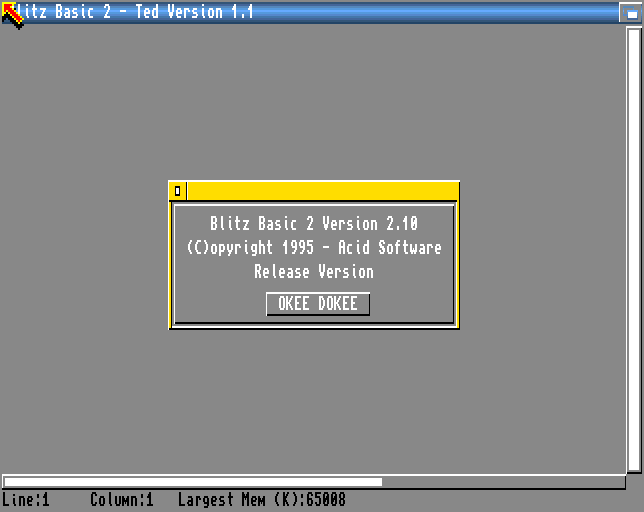
Click OKEE DOKEE, and the editor is ready.
To have blitz2: after every start, put the Assign line into the file
S:User-Startup of the Workbench.
The debugger module
blitz2 also looks for a debugger module, blitz2:defaultdbug, a program
that shows runtime errors of a program run from the editor and lets you
look at it. The build does not make it, and blitz2 runs without it; but
then a program run from the editor with runtime error checking on stops at
its first runtime error without any message.
You can build the module with the port itself, from its Blitz Basic source in the archive of the original sources:
Fetch the original sources
On the host, in the repository:
cmake -P cmake/fetch-originals.cmakeThe source is then archive/aminet/amibl2src/bblibsrc/dhandler.bb2,
with its .xtra file.
Compile it in the emulator
Make that directory visible in the emulator, for example as a third drive
ORIG:, and compile the source into the blitz2 directory:
Cd ORIG:
blitz2:blitz2-ab3 -s dhandler.bb2 -e blitz2:defaultdbug
The next start of blitz2 loads it. LOAD DEBUG MODULE in the editor’s COMPILER menu loads a module from another place, also while blitz2 runs.
If it does not start
- The screen stays black, or Amiberry reports an unknown ROM: the
encrypted ROM needs
rom.keyin the same directory. The setup script puts it there; keep the two together when you move them. - A requester says the volume Workbench is write-protected: the
hardfile is mounted read-only. Set it to writable (
rw) in the configuration. blitz2:is not known: theAssignwas not made in this Shell or since the last start, or the drive is not calledBB2C.- blitz2-ab3 from the Shell does nothing useful on an old machine: its command line needs Kickstart 2.0 or newer.