Your first program
Before this page you should have blitz2 running in the emulator, with its editor on the screen (Running it in an emulator).
This page writes a small program in the editor, runs it, saves it and makes an executable of it, and then compiles a text file from the Shell without the editor.
Typing a program
The editor works like most text editors: type, move the cursor with the cursor keys, delete with Backspace and Del. Return opens a new line below the cursor line; it does not split the line at the cursor. When you leave a line, the editor turns its keywords and commands into tokens and shows them in another colour (Tokenised sources explains why). All keys, blocks, search and the other menus of the editor are described in the chapter The editor.
Type this program:
a$="Hello"
NPrint Left$(a$,2)
NPrint "from the BB2 C port"
Delay_ 150
End
NPrint prints its arguments and a line end, and Left$ takes the first
characters of a string. Delay_ is a call of AmigaOS: it waits 150
ticks, three seconds, so that the output stays on the screen long enough
to read it.
NPrint and press the HELP key: the screen’s title
bar shows the command with its arguments, NPrint Expression[,Expression...].
That works for every command of every loaded library, and it is the
quickest way to look one up.Running it
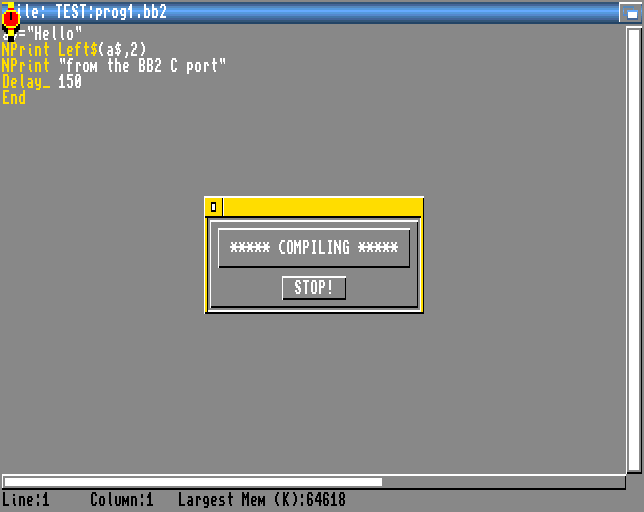
Choose COMPILE AND RUN in the COMPILER menu, or press the right Amiga
key with X. blitz2 compiles the program, with a small requester that
shows COMPILING and a STOP button:
Then the program runs. Its output appears in a window of its own, the “Blitz 2 CLI Window”:
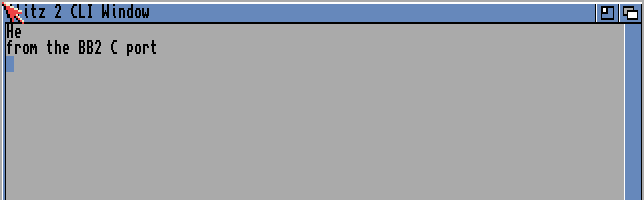
When the program ends, the window closes and you are back in the editor.
If the program has an error, the compiler shows the message in a requester and puts the cursor on the line with the error. It reports one error at a time.
Runtime error checking
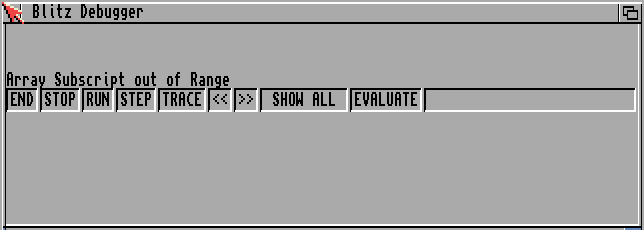
The compiler options have runtime error checking on by default: the program is compiled with checks that stop it at errors such as an array index out of range. What happens then depends on the debugger module (The debugger module):
With the debugger module, the program stops and the debugger shows the error:
Without it, the program simply ends at the error, without a message.
Change the option in COMPILER OPTIONS, the switch Runtime Error Debugger, or build the debugger module as described on the previous page.
Saving and loading
The PROJECT menu has the file commands:
| Item | Key | What it does |
|---|---|---|
| NEW | Clears the editor for a new program. | |
| LOAD | Amiga-L | Loads a source with the file requester. |
| SAVE | Amiga-S | Saves the source; the file requester asks for the name. |
| QUIT | Amiga-Q | Leaves the editor and blitz2; with unsaved changes, a requester asks first. |
Saving a source also writes a second file next to it, with .xtra
appended to its name. It holds the compiler options of this source
(Residents and the .xtra file).
SAVE keeps the previous version of the source as a .bak file and can
write an icon as well
(What SAVE writes).
Making an executable
Choose CREATE EXECUTABLE in the COMPILER menu (Amiga-E). A file requester asks for the name of the executable, blitz2 compiles the program into it, and you can start it from the Shell like any other program.
The whole COMPILER menu is described in The editor and the compiler.
Compiling from the Shell
blitz2-ab3 compiles a source without the editor. The source can be a
text file, written with any editor on your host, in a directory the
emulator shows as a drive. With a file hello.bb that holds the lines
a$="Hello", NPrint Left$(a$,2) and End:
1> blitz2:blitz2-ab3 -s hello.bb -e RAM:hello
1> RAM:hello
He
The text is tokenised when it is loaded, as the editor would do it. A compile error is printed with the file name and the line:
1> blitz2:blitz2-ab3 -s broken.bb -e RAM:broken
broken.bb:2: Syntax Error
The return code is 0 when the program compiled, 10 for a compile error
and 20 for wrong options, so it can be used in scripts. Two things are
needed for this: Kickstart 2.0 or newer, and the program ab3cli in the
same directory as blitz2-ab3, as it is in the build’s blitz2 directory.
The options are described in
Compiling from the command line.
Learning the language
This site does not teach Blitz Basic itself. The book for that is the
Blitz Basic 2 manual by Acid Software, written for version 2.1, the
version the port is made from. Its first part is a course: the editor
and its menus, the first programs with Print, variables and loops,
types, arrays and lists, procedures, error checking and the debugger,
the Blitz objects (screens, windows, shapes and the others), Blitz mode
for games, and advanced topics such as macros, resident files and
inline assembler, followed by complete example programs. Its second
part is a reference of the commands of acidlibs, chapter by chapter.
The manual is a plain text file, BLITZ2_MANUAL, on the CD “Ultimate
Blitz Basic 2.1”, which the
Internet Archive
keeps.
Three things differ for the port. The manual’s installation from floppy
disks is replaced by the build and the drive of this chapter. The port
fixes many bugs of the original, and a few sources that the original
compiled are refused; both are described in
Differences from the original.
And the constant #__debug, which tells a program whether it was
compiled with runtime error checking, is the one addition of the port to
the language
(Extensions).
For the commands, their arguments and the libraries the manual does not cover, use the HELP key and the Libraries chapter: its pages are written for the port and checked against its libraries.